
Review terminated employees
Terminated employee review helps HR and payroll teams confirm that leavers are handled correctly in payroll, reporting, and employee records.
WiseWage SupportUpdated June 20265 min read
Available for: Company Admin, HR Admin, Payroll AdminPlatform: HR PlatformPlan: Core HR, Payroll, Enterprise
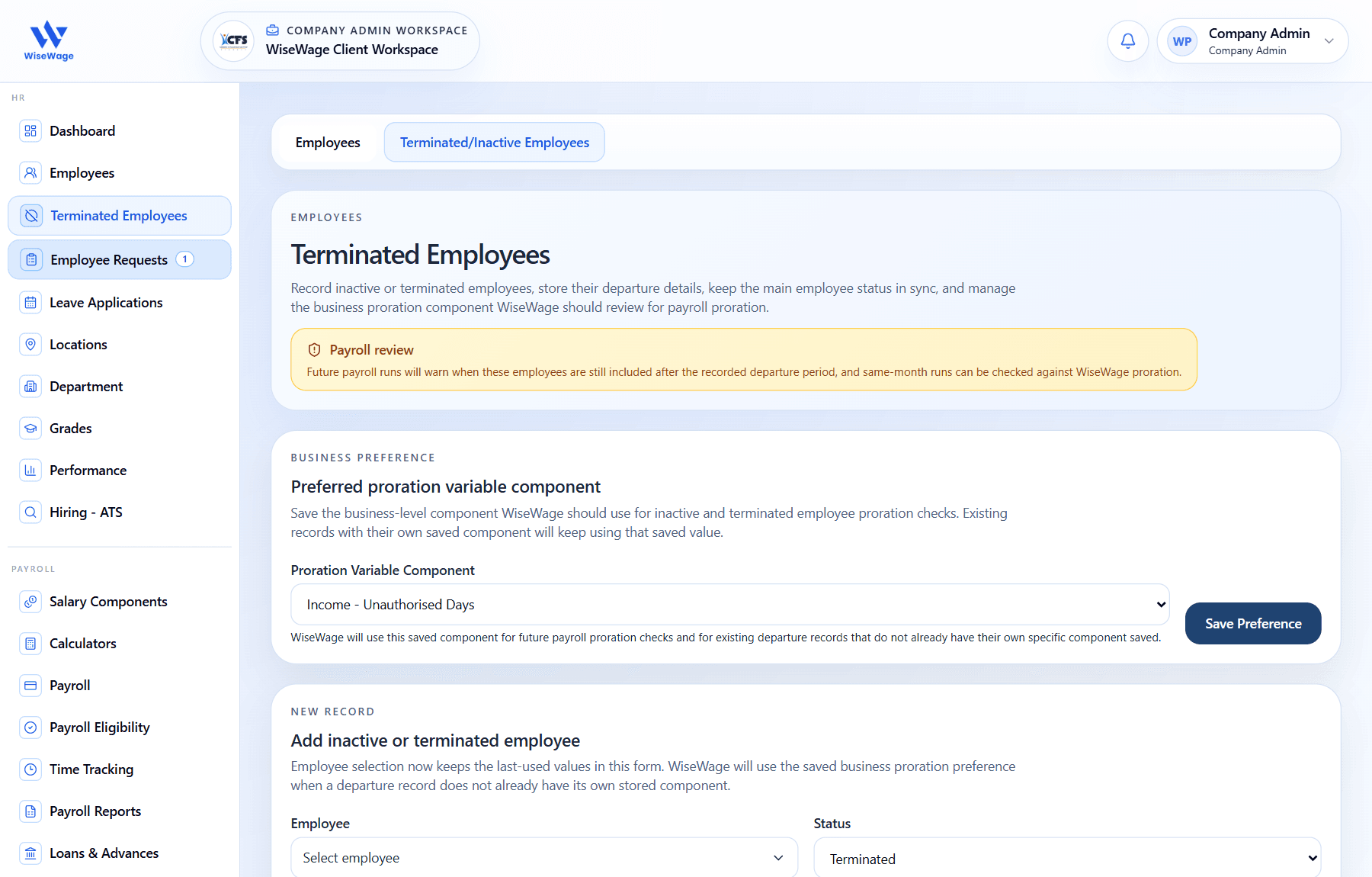
1Open Terminated Employees
2Set proration preference
3Add inactive or terminated record
Set the proration reference
The proration reference tells WiseWage which salary component to use when future payroll checks need to compare an inactive or terminated employee against a prorated value. It is a business preference, not an employee record by itself.
- 1Open HR > Employees, then open Terminated/Inactive Employees.
- 2In Preferred proration variable component, choose the salary component your company uses for departure-period proration, such as unauthorised days or another approved proration component.
- 3Click Save Preference.
- 4Existing departure records without their own saved component will keep using the last saved preference.
- 5Change this preference only when payroll policy changes, because future payroll checks will use the saved component for proration review.
Review terminated staff
- 1Open HR > Employees, then open the terminated employee view where available.
- 2Search for the employee by name or staff ID.
- 3Open the employee record and review status, employment date, effective date, reason, and remarks.
- 4When adding records in sequence, the form keeps the last saved inactive or terminated values for employees without their own saved departure record.
- 5Confirm whether the employee should be excluded from upcoming payroll runs, included for a same-month final run, or reviewed against the saved proration reference.
Before payroll
- 1Check departure warnings during payroll preparation.
- 2Confirm the selected proration component is still the correct reference before approving runs with inactive or terminated employees.
- 3Confirm final salary components, claims, loans, advances, and leave treatment before approval.
- 4Check whether same-month runs include employees after their recorded departure period and review the proration warning before continuing.
- 5Keep termination notes complete for audit review.
Review the payroll report
- 1Open Payroll > Payroll Reports and download the Terminated Employees Report for the reporting period.
- 2The report includes inactive and terminated employees, shows their status beside the department or location column, and uses the saved departure remarks for the remarks column.
- 3Final Salary Paid is inferred from WiseWage payroll runs for the employee's departure month. It shows Yes only when the employee appears in a paid or partially paid run, and it cannot confirm payments made outside WiseWage.